The Telemetry Dashboard is your real-time virtual pit wall. When connected to your Gran Turismo 7 console, this
screen interprets live UDP data to give you split-second insights into your car's behavior.
1. Live Pedals & Steering 🛞
The pedal traces provide a live view of your throttle and brake inputs. This is crucial for analyzing trail
braking and ensuring you're reaching 100% throttle on straights.
Throttle Trace: Highlighted in green, shows acceleration pressure.
Brake Trace: Highlighted in red, shows braking pressure.
Steering Angle: A live wheel indicator showing precise turning degrees.
Time Range Sliders: Smoothly adjust your telemetry history window anywhere between 2 to 30 seconds for deep input analysis.
2. Speed, RPM, & Gears ⚙️
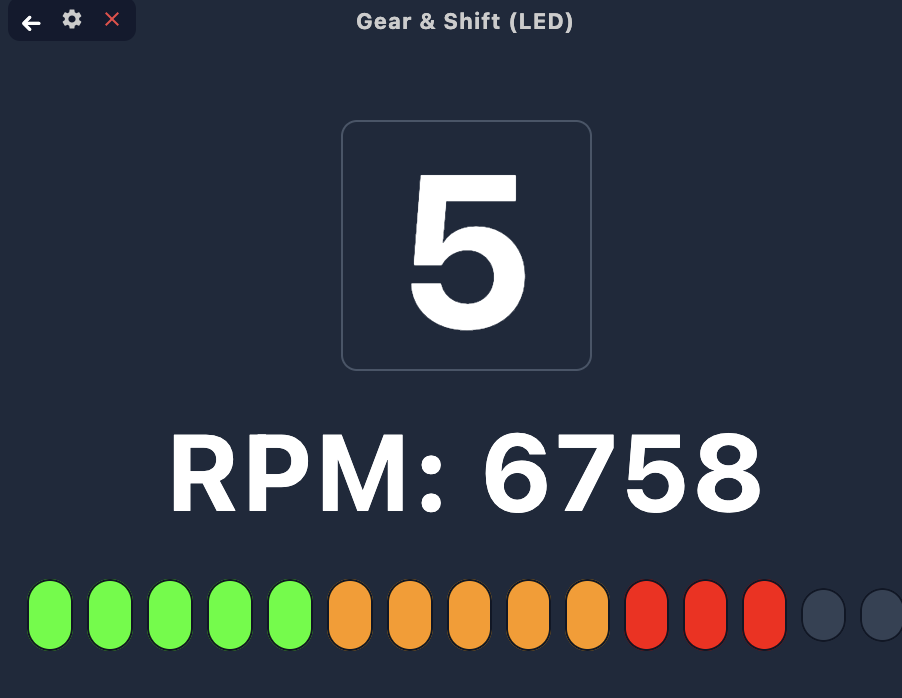
Never miss a shift again. The dashboard features a massive, easy-to-read gear indicator and a digital
speedometer.
3. Audio Shift Tone Engine 🔊
Instead of staring at your screen, let the Shift Tone Engine guide you. It plays precise audio cues based on the
optimal RPM shifting point for
your specific car model.
The interactive track map provides a comprehensive top-down view of your current position and lap history. You can now deeply analyze racing lines on both the live telemetry map and the unified dual-track comparison map.
Smooth Zoom Slider: Get a closer look at tight corners with a smooth slider that adjusts the lap view from 5% up to a full 100% of the lap duration.
True-Time Playback: The dual-track map accurately synchronizes compared laps in real-time. Faster laps naturally pull away and finish first!
Difference Highlights: The map automatically calculates and highlights the segments where the distance between the two compared laps varies the most. Toggle the analysis window between 5s, 10s, and 15s segments to focus on long straights or tight corners!
Dual Distance Delta: See precisely how much time you are gaining or losing with the new Δ difference plate crossing the dual distance graphs.
5. Live Stint Delta & Time Trial (TT) Mode ⏱️
Monitor your pace difference in real time using 60 Hz 3D spatial trajectory projection. The live delta indicates whether you are gaining (GREEN ▲) or losing (RED ▼) time relative to your reference lap.
Standard Stint Mode (Default - TT Unchecked): Engineered specifically for race stints and endurance sessions:
Out-Lap Exclusion: Lap 1 is strictly excluded as the pit-exit out-lap or standing race start.
Lap 2 Baseline: Lap 2 automatically establishes your initial stint baseline reference.
Progressive Faster-Lap Benchmark: From Lap 3 onwards, live delta tracks against your fastest completed lap of the current stint, automatically updating whenever you set a faster lap time.
Pit-Stop Aware Stint Cycles: Pitting or remaining stationary (>10s) automatically resets the stint cycle for fresh tire and fuel management.
Time Trial (TT) Mode (TT Checked): Checking the Time Trial toggle in the Stint Delta card activates instant qualifying delta tracking:
Instant 100% Fuel Benchmark: Pit Crew Hub automatically queries your saved laps for your personal best 100% fuel lap in the same car and track.
Immediate Lap 1 Delta: Live delta calculation starts the exact moment you cross the start/finish line on Lap 1.
Automatic First-Lap Baseline: If no previous 100% fuel lap exists in your garage, your very first flying lap automatically becomes the baseline reference once completed.
6. Community Reference Laps & Cloud Benchmarks ☁️
Finding the perfect reference lap is effortless with Pit Crew Hub's community telemetry distribution:
Community Reference Lap Distribution: When drivers share telemetry with friends or select Share with all friends & community, reference laps become instantly accessible to all authenticated drivers on Pit Crew Hub. Drivers across the community can browse, inspect, and download these shared laps directly into their local library.
Top Shared Reference Laps for Every Car: To help drivers quickly discover high-quality benchmarks for any chassis in their garage, the top fastest shared laps for each car and track are automatically spotlighted in cloud search. Whether preparing for Daily Races, testing GT3 Balance of Performance (BoP), or tackling tricky endurance circuits, drivers can instantly load the best community reference traces into their cockpit for live split deltas, audio braking cues, and Same Corner comparisons.
Clean Flying Lap Quality Standard: To guarantee benchmark integrity, only clean, completed flying laps qualify as reference or personal best laps. Laps must have verified start line crossings, cover the full circuit distance, and be completed continuously without pauses or stopping on track.
7. Discord Audio Routing 🔊
Rather than wearing a headset connected locally to your PC or device, you can route all shift beeps, braking cues, and spotter announcements directly into a Discord voice channel.
Teammate Collaboration: Let your team or friends in the channel listen to your exact shift and braking cues in real-time.
Zero-Config Bot Playback: Once connected via your profile's linked Discord servers, the Pit Crew Hub Bot joins your voice channel and streams synthesized beep waves and dynamically converted text-to-speech spotter alerts.
Configurable Delay: If you are using a livestream overlay, adjust the delay slider in the settings to perfectly sync your voice channel audio with your video feed!
8. 3D Elevation Auto-Discovery 📍
Pit Crew Hub automatically discovers which track layout you are driving on as soon as you spawn in the pits or start a stint. To guarantee absolute accuracy, our discovery engine analyzes:
3D Coordinates (X, Y, Z): Differentiates layouts by checking absolute coordinates as well as vertical elevation (altitude) data.
Pitch, Roll, and Yaw: Analyzes the orientation of the car inside the pit lanes to immediately tell apart normal and reverse layouts.
Fail-Fast Resolution: If multiple candidate layouts are matched, the app highlights them in a warning banner so you can select the exact layout without losing any lap records.
9. Voice Assistant ("Pit Crew") 🎙️
Talk directly to your crew chief using continuous voice activation. While driving, you can ask for real-time race data without taking your hands off the wheel or looking away from the track.
Activation Toggle: Click the microphone icon in the dashboard top bar to turn continuous listening on or off.
Wake Word: Speak "Pit Crew". The app will respond with a radio beep tone indicating it is ready to receive your command.
Supported Inquiries:
"How is my fuel?" / "Can I finish the race?" — Gets your current fuel level, average consumption per lap, or whether you can complete the stint without pit stopping.
"What are my tire temperatures?" — Identifies the hottest tire on your car and its temperature.
"How is my delta?" — Announces your current pace delta relative to the reference lap.
"What lap is this?" / "What is my position?" — Returns your current lap count, remaining laps to the finish, or your position in the field.
Troubleshooting & Mobile Settings Checks 🛠️
If the voice activation does not react or plays continuous chime noises on your mobile device, please check the following settings:
Offline Language Packages (Mandatory): Since voice recognition is performed entirely locally on your device for fast, low-latency offline responses, you must download the offline speech recognition package:
Android: Go to the Google App -> tap your profile icon -> Settings -> Voice -> Offline speech recognition -> Download English (US).
iOS: Go to Settings -> General -> Keyboard -> Ensure Enable Dictation is active and English language package is installed.
Default Speech/Assistant Engine (Android): Some custom manufacturer overlays (like Samsung or Xiaomi) set their own assistant (like Bixby or Samsung Voice Input) as default. This can cause compatibility issues with the app's speech loop.
Go to Settings -> Apps -> Choose default apps -> Digital assistant app -> Select Google as your default Device Assistant.
Microphone Privacy Toggles: In Android 12+ and iOS 15+, there are global privacy toggle switches for the microphone. Swipe down your quick notification panel or check privacy settings to ensure the microphone access is not globally muted.
Runtime Permissions: Ensure you have granted microphone/recording permissions to the Pit Crew Hub app when prompted.